A shared clipboard for Windows, macOS and Linux. Text, images and files travel through a server you run yourself and are encrypted before they leave the device. The server only ever sees ciphertext.
Bringing the server up is one command: docker compose up -d, then check the log.
Repo for the review: https://github.com/erneywhite/clipwire (main branch).
report-q3.pdf2.4 MB
CtrlCcopied
macbook · macOS
Weekly active devices
Works for me. Meeting moved to Thursday, 15:00. Room 4B
⌘Ccopied
········
shared history
Search clipboard
HistoryPinned
https://docs.rs/iroh/latest/iroh/macbook · Safari · 40 min
Thanks! I will send the slides before lunch.work-pc · Teams · 1 h
Riga, Brīvības iela 40macbook · Maps · 2 h
↵ paste␣ previewCtrl P pinDel delete
What travels over the wire
Whatever you copy shows up on your other devices a moment later, in a history you can search.
01Text, with formattingCopying from a browser, Word or a mail client keeps the HTML and RTF. Enter pastes it formatted, Shift+Enter pastes plain text.
02ImagesScreenshots and pictures arrive as lossless PNG with a large thumbnail. Space opens the full image, Ctrl+E opens the editor.
03Files and foldersA card with the name and size appears everywhere at once. Files up to 100 MB (adjustable) are uploaded encrypted right away. Larger ones come straight from the source computer when you paste.
04LinksSpace shows a card built from the page's og: tags. The page itself never runs, and links that look single-use (reset, token, magic login) are not fetched at all.
Text, with formatting
Copying from a browser, Word or a mail client keeps the HTML and RTF. Enter pastes it formatted, Shift+Enter pastes plain text.
Release notes
Paste window opens next to the cursor
Pins sync across devices
Exclusions for files and folders
↵ Enter⇧ Shift + ↵
Release notes
Paste window opens next to the cursor
Pins sync across devices
Exclusions for files and folders
Release notes
Paste window opens next to the cursor
Pins sync across devices
Exclusions for files and folders
formatted
HTMLfrom Chrome
Shift+Enterplain text only
RTFfrom Word
Images
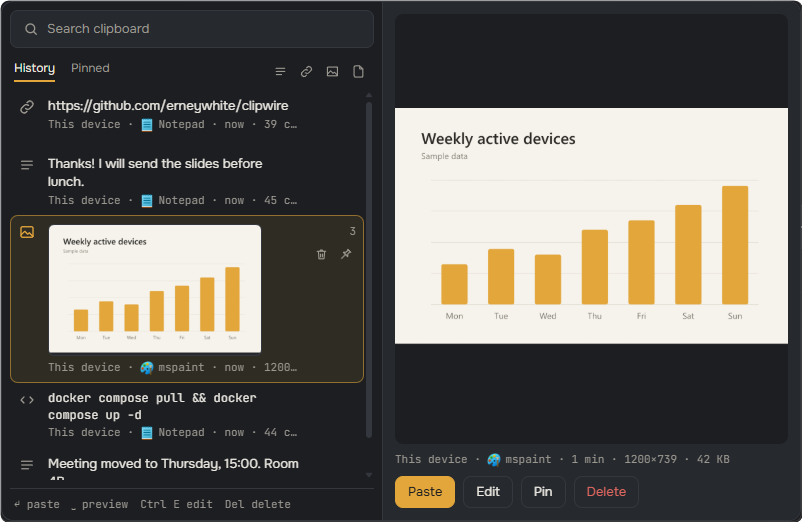
Screenshots and pictures arrive as lossless PNG with a large thumbnail. Space opens the full image, Ctrl+E opens the editor.
␣ Preview opens next to the list
Lossless PNG1200×739 · 42 KB
Image 2026-11-16 14-05-09.pngpasted into a folder as a file
Ctrl+Earrow, blur, crop, text
Files and folders
A card with the name and size appears everywhere at once. Files up to 100 MB (adjustable) are uploaded encrypted right away. Larger ones come straight from the source computer when you paste.
work-pc
clipwire-demo.mp4186 MB
macbook
clipwire-demo.mp4card arrived, waiting for paste
↵
clipwire-site/38 files, .gitignore honoured
Directfrom the source when it is online
Encrypted partsserver disk, S3 or SFTP
Links
Space shows a card built from the page's og: tags. The page itself never runs, and links that look single-use (reset, token, magic login) are not fetched at all.
https://github.com/erneywhite/clipwire␣
erneywhite/clipwireShared clipboard for your computers, through your own server.github.com
https://accounts.example.com/reset?token=8f2c…looks single-use, not fetched
og:title · og:imagefirst 512 KB of HTML only
Open in browserone click from the card
localhost, 192.168.x.xnever fetched
The server only sees noise
Each entry is encrypted on the device with the group key. The key lives in the invitation code and on your devices, never on the server.
on work-pcDB_PASSWORD=sunflower-orbit-42
on the server········
on macbook········
The local history is encrypted too: DPAPI on Windows, Keychain on macOS, Secret Service on Linux.
Content that password managers mark as private never leaves the device.
Lost a laptop? Remove it from the group: the key is replaced and the other devices get the new one.
Not everything should travel
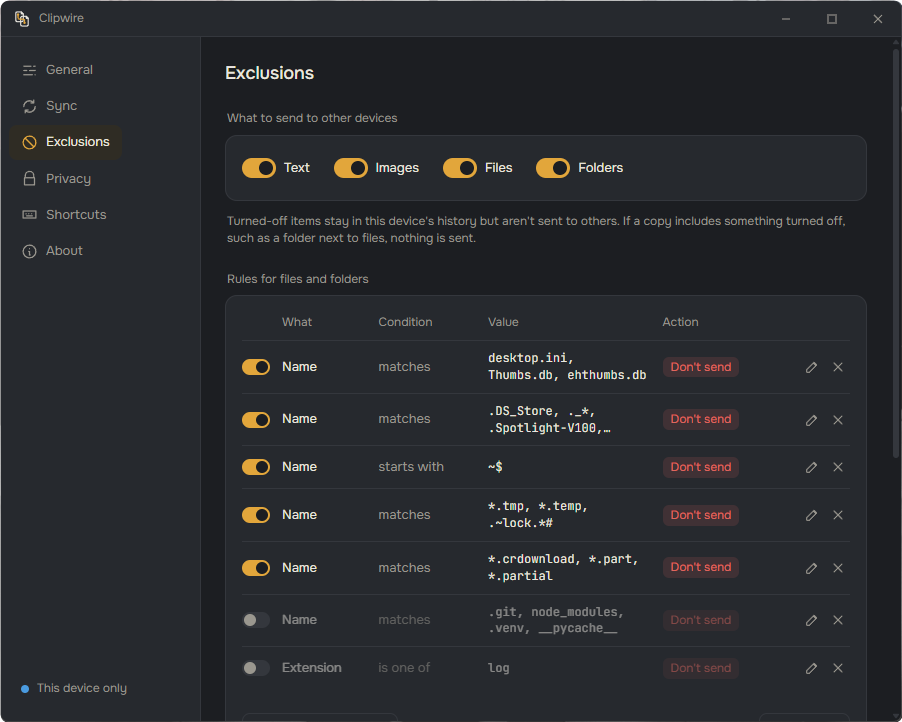
Rules decide what stays on this computer: by extension, name, mask or size. System clutter is dropped out of the box, and password managers are excluded by default.
exclusionssent →notes.mdThumbs.dbsystem filescreenshot.png.env.gitignoreMeeting at 15:00KeePassXCpassword managerinvoice.pdfnode_modules/.gitignore~$report.docxlock filedeploy.sh.DS_Storesystem file
With “Honour .gitignore” on, a copied project folder leaves behind whatever its .gitignore lists, such as .env and build output.
One container. Your server.
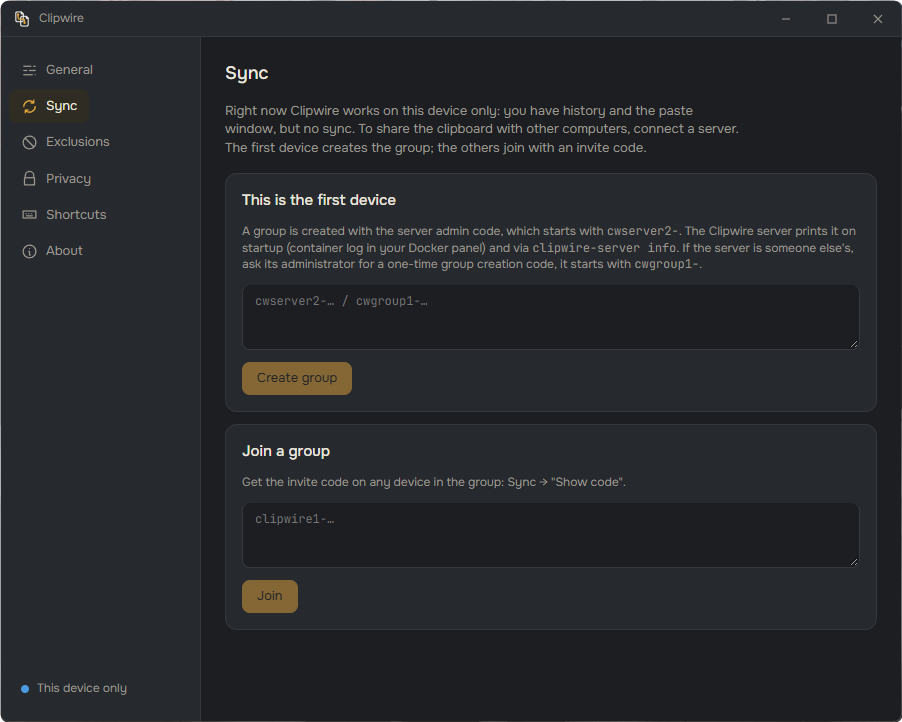
The server is a single Docker container with an iroh relay built in. It is set up from a Docker panel, no SSH needed.
On the same network devices connect directly. Everywhere else traffic goes through your relay.
Files are kept on the server disk, in S3-compatible storage or on SFTP.
Devices that were off pick up what they missed from a short mailbox with a retention period.
No server yet? The app works as a local clipboard history on one computer.
Thanks! I will send the slides before lunch.Teams · today
git log --oneline -20Terminal · yesterday
https://github.com/erneywhite/clipwireFirefox · 12 Nov
Paint · 3 Oct
Wi-Fi at the cottage: Lisma-5GNotepad · July 2026
tax-return-2025.pdfExplorer · March 2026
ssh-keygen -t ed25519 -C "laptop"Terminal · December 2025
Order #4471, delivery FridayMail · June 2025
Thanks! I will send the slides before lunch.Teams · today
git log --oneline -20Terminal · yesterday
https://github.com/erneywhite/clipwireFirefox · 12 Nov
Paint · 3 Oct
Wi-Fi at the cottage: Lisma-5GNotepad · July 2026
tax-return-2025.pdfExplorer · March 2026
ssh-keygen -t ed25519 -C "laptop"Terminal · December 2025
Order #4471, delivery FridayMail · June 2025
Works without a server too
Install it on one computer and skip the server: Clipwire becomes a clipboard history that never loses anything. Search, pins, previews and the paste window all work offline.
With history set to “Forever” every copy stays, encrypted on disk.
Copied files are kept as links to the originals, so the history does not fill up the disk.
On 43,000 entries a search for a rare word takes about 0.2 s.
Connect a server later: the last 50 entries go to the group, and the local history stays.
Try the paste window
Ctrl+Shift+V opens it next to the mouse cursor (Cmd+Shift+V on macOS). This copy works right here: arrows, Enter, Space for preview, or just start typing.
HistoryPinned
docker compose pull && docker compose up -dwork-pc · Terminal · now · 44 chars1
Yes. Clipwire is free and open source under AGPL-3.0, with no paid tier and no account. If it saves you time, you can support the author on Ko-fi.
Do I need my own server?
Not on a single computer: without a server Clipwire is a local clipboard history. To sync between computers you run the server, which is one Docker container, or join a group on a server someone already runs with a group creation code.
Can the server read my clipboard?
No. Every entry is end-to-end encrypted with the group key before it leaves the device. The key lives on your devices and in the invitation code, the server stores and forwards only ciphertext.
Does it work outside my local network?
Yes. Devices on the same network connect directly, everywhere else traffic goes through the relay built into your server, so a laptop on the road still syncs with the PC at home.
Which systems are supported?
Windows (x64), macOS 13 Ventura or newer on Apple Silicon and Intel, and Linux x86-64 on X11 and Wayland: GNOME, KDE Plasma, Sway, Hyprland and others. There are no phone apps.
What can it sync?
Plain and formatted text (HTML and RTF), images, files and folders. Files up to 100 MB are uploaded right away by default, larger ones are pulled from the source computer when you paste. Files can be stored on the server disk, in S3-compatible storage or on SFTP.
How is it different from Universal Clipboard or Paste?
Universal Clipboard works only between Apple devices, and Paste is a paid app for Apple platforms. Clipwire connects Windows, macOS and Linux through a server you control, is free, and can import your history from Paste.
Free, made by one person
Clipwire is free and has no paid tier. If it saves you time, you can support the author on Ko-fi.